Locations:





 Search
A few simple adjustments to your chair, desk and computer can help reduce strain
You don’t have to run a marathon to wake up sore. Sometimes, all it takes is sitting still.
Advertisement
Cleveland Clinic is a non-profit academic medical center. Advertising on our site helps support our mission. We do not endorse non-Cleveland Clinic products or services. Policy
Hours hunched over a laptop or slumped in a desk chair can leave you with headaches, a stiff neck or an aching back. Over time, those annoying daily aches can become much bigger health problems.
A helpful approach to limit those aches? Ergonomics.
“Ergonomics is about maximizing your body’s efficiency while you’re doing a task without putting unnecessary strain on your body,” explains chiropractor Andrew Bang, DC.
Here’s how to apply ergonomic principles to make work life easier on your body.
Ergonomics is the practice of arranging your workspace so your body can work as productively and comfortably as possible. It means putting your body in positions that reduce unnecessary stress on your muscles and joints.
When your setup is off, even just a smidge, your body often compensates in ways that put extra stress on muscles and joints. It can lead to poor posture and long-term discomfort.
“Little things we experience every single day — like sitting at our computer trying to finish a project — can bring on lots of aches and pains,” Dr. Bang says. “It becomes a slow drip of discomfort that builds over time.”
Poor ergonomics usually doesn’t cause major problems overnight. Instead, it’s often slowly building discomfort, as small strains build up over months and years. That can lead to:
Advertisement
A flawed desk setup can make you crane your head forward and hunch your shoulders to do your work. That sort of cumbersome positioning can overwork and tighten up your neck muscles.
That steady strain can irritate joints and pinch surrounding tissues. Eventually, it may send pain up the neck and into the base of the skull, leading to tension headaches.
If things on your desk aren’t in the right spots, you may find yourself slumping, reaching or twisting in unnatural ways. This forces the muscles in your shoulders and back to work overtime.
This off-balance posture can unevenly work your spine and shoulder joints. The resulting tension and stiffness can spread across the upper and lower back.
Bad ergonomics can trap your hips in cramped or awkward positions for hours. This positioning squeezes the hip joint, which can make surrounding muscles tighten.
This strain can spark stiffness, aching, and inflammation deep in the joint or the muscles around it. Over time, that constant uneven pressure leaves your hips less willing to move freely.
Long hours of slouched sitting can make your glute muscles “fall asleep” on the job. When they check out, your hips, lower back and legs pick up the slack. This can leave those areas overworked, creating a chain reaction of discomfort known as “dead butt syndrome.”
Over time, repeated strain on your joints from bad ergonomics can wear away protective cartilage and irritate joint linings. This sets the stage for osteoarthritis, which can bring stiffness, pain and reduced mobility.
“You don’t actually know you have osteoarthritis until it’s too late,” says Dr. Bang. “The daily aches and pains are the warning signs.”
Want to avoid taking workplace body aches into retirement? The solution starts with sitting with proper posture. The goal isn’t to sit perfectly rigid. It’s to keep your body in a neutral position.
To do that, Dr. Bang recommends:
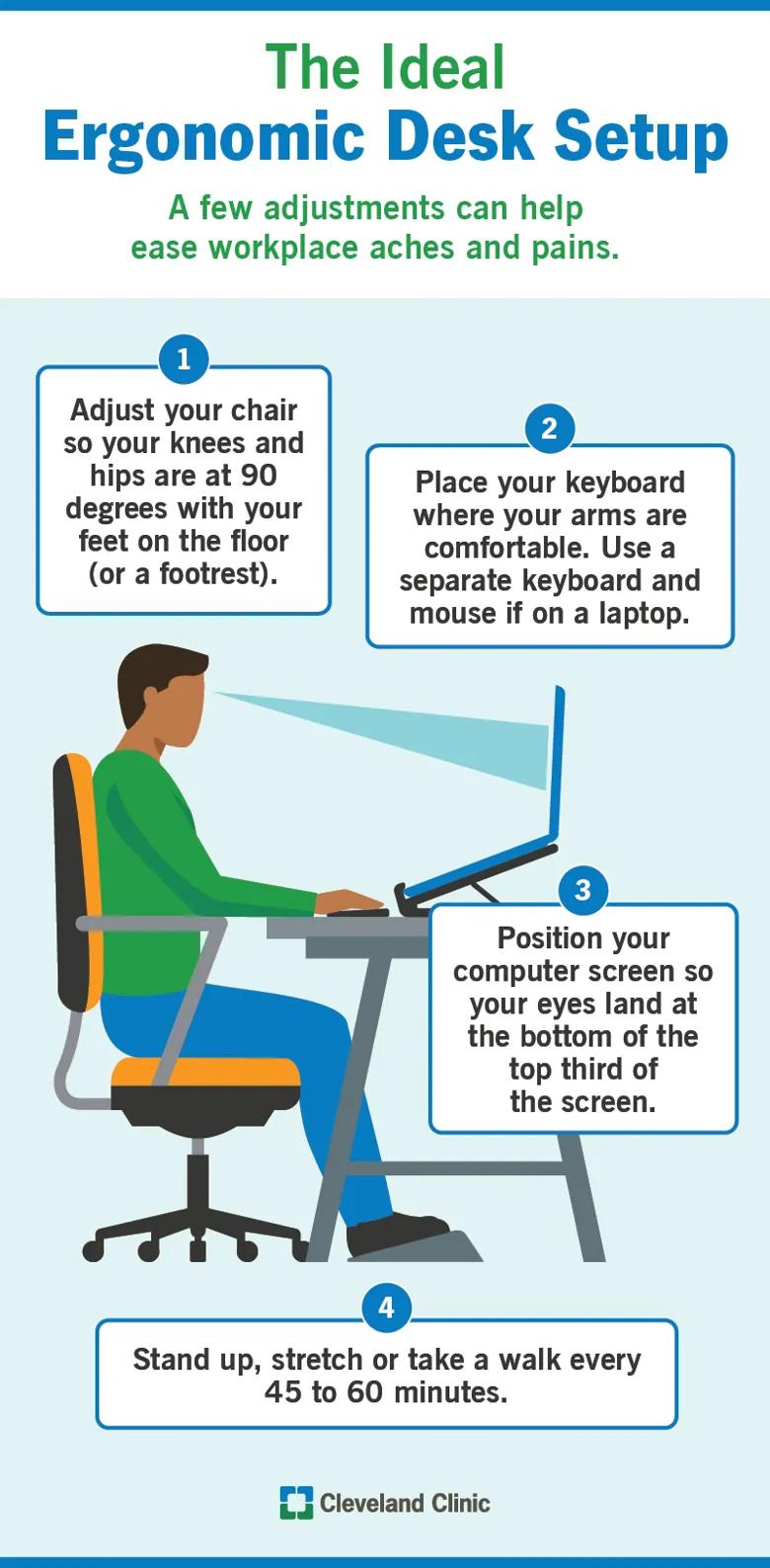
Image content: This image is available to view online.
View image online (https://assets.clevelandclinic.org/transform/701ede3d-164e-4de6-90f0-67398ef0d0a5/ErgonomicDeskSetup-infographic-800x1630-2)
A few workplace adjustments can make a surprisingly big difference in how your body feels at the end of the day. Let’s look at what you can do to get your chair, desk and computer screen set just right.
Getting your chair squared away is a top priority because it determines the position of the rest of your body as you go about your daily desk tasks. Adjust the height of the chair so:
Advertisement
Your desk position should keep your shoulders relaxed while you type.
If you primarily work on a laptop, Dr. Bang recommends using a separate wireless keyboard and mouse. That lets you place your keyboard where your arms are comfortable while raising your screen to eye level.
“It’s one of the cheapest changes you can make that gives you the biggest payoff,” he says.
Position your computer screen so your eyes naturally land around the bottom portion of the top third of the screen. That helps keep your head in a neutral position instead of looking down, which can strain your neck and shoulder muscles.
“Your head weighs about 10 to 12 pounds,” Dr. Bang says. “The farther it moves in front of your shoulders, the more stress it puts on your neck.”
If your monitor is too low, try raising it with books or a monitor stand to get it to a better height.
Even the perfect desk setup won’t keep you free of all aches and pains if you stay in one position all day.
Aim to stand up, stretch or take a walk every 45 to 60 minutes. Attach movement to habits that you already have, like getting a cup of coffee, refilling your water bottle or taking a bathroom break.
Advertisement
“Our bodies aren’t meant to be static,” emphasizes Dr. Bang, “so make sure to move.”
Ergonomic adjustments are typically small, like moving your keyboard an inch or so — but they can make a big difference. That’s why it’s important not to wave off aches and pains that come from sitting at a desk.
“Listen to your body,” emphasizes Dr. Bang. “What it’s telling you today can save you from much larger problems later on.”
Advertisement

Sign up for our Health Essentials emails for expert guidance on nutrition, fitness, sleep, skin care and more.
Learn more about our editorial process.
Advertisement
Working beyond your limits can increase illnesses and accidents related to your physical and mental well-being

Help calm the angst that can come with the start of a new work week by adopting a positive mindset, planning an activity and getting some exercise
Taking a stand throughout the day can lower your risk of disease while improving your energy, focus and productivity

A hostile work environment can foster a culture of aggression, doubt and negativity that’s harmful to your health and success

Not having paid sick leave, working night shifts and lacking consistency in schedule or pay can cause serious psychological distress
Schedule breaks, stand and stretch, and rely on alarms, to-do lists and other tools to help keep you focused

Work burnout can leave you exhausted and frustrated at work and beyond, but you can beat it by setting boundaries and surrounding yourself with positivity

Decide what you’re OK sharing, respect others and speak up if you feel uncomfortable

Gradually increasing your training, choosing proper footwear and listening to your body can help keep shin pain from sidelining your workouts

Self-stimulating behaviors can help you self-regulate or cope with intense emotions

At-home remedies may help calm symptoms and make it easier to relax at bedtime